

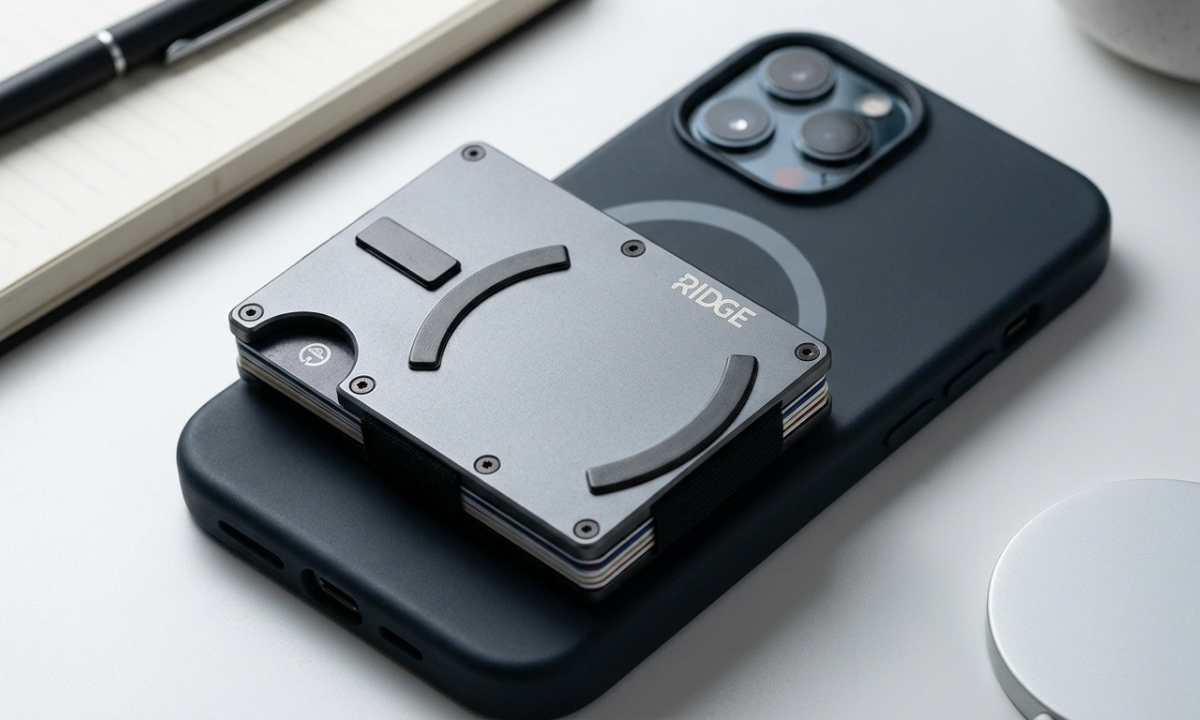
A wallet and smartphone are two things many people carry every day, so combining them can make everyday carry simpler. The Ridge Wallet for MagSafe is designed for this purpose, combining Ridge’s slim card-wallet design with magnetic attachment for compatible iPhones.
The Ridge Wallet MagSafe setup is more than just a wallet with magnets. Compatibility, card capacity, phone cases, charging, and optional accessories all matter when deciding whether this type of wallet is right for you. This guide explains how Ridge’s MagSafe wallet works, what accessories are available, which devices are supported, and what to consider before choosing a setup.
What Are Ridge Wallet MagSafe Accessories?
Ridge Wallet MagSafe accessories are products designed to work with the magnetic attachment system used by Ridge’s MagSafe-compatible wallet. The lineup includes the Ridge Wallet for MagSafe and additional components such as the optional Strengthening Tray.
The purpose is straightforward: give users a way to carry cards while allowing the wallet to attach magnetically to a compatible phone or case.
Understanding MagSafe Compatibility
MagSafe is Apple’s magnetic accessory system. On supported iPhones, MagSafe accessories attach to the magnetic area on the back of the device or to a compatible MagSafe case. Ridge’s Wallet for MagSafe is specifically designed to connect with MagSafe-compatible iPhones. Ridge currently lists the wallet’s compatibility as iPhone 13 and newer and uses high-strength N52 neodymium magnets in its design.
Ridge Wallet MagSafe is important not to assume that every phone or phone case will provide the same magnetic connection. The device, case, and accessory all need to be considered together.
How Ridge Wallet Accessories Work With MagSafe
The Ridge Wallet for MagSafe contains integrated magnets that allow Ridge Wallet MagSafe to attach to the magnetic area on a compatible iPhone. Ridge also offers an optional Strengthening Tray. The tray is designed to improve magnetic adhesion and provides an alternative setup for devices that do not have the same built-in MagSafe compatibility. This makes the accessory useful for people who want more flexibility in how they use their wallet rather than limiting the product to one particular phone configuration.
Why MagSafe Compatibility Matters
Compatibility determines whether the wallet will attach as intended. A properly compatible setup can make attaching and removing the wallet convenient, while an unsuitable case or device can affect the magnetic connection. Before buying, it is therefore better to check the exact phone model and case rather than relying only on the word “MagSafe.”
Ridge Wallet MagSafe is also important to remember that a magnetic wallet and a MagSafe charger serve different purposes. When charging with a MagSafe charger, the wallet should be removed from the phone.
How Does Ridge Wallet MagSafe Work?
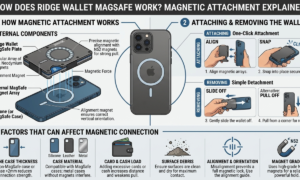
The Ridge Wallet MagSafe uses magnets built into the wallet to create a connection with a compatible magnetic surface. Ridge says its wallet uses N52 neodymium magnets and a polycarbonate magnet housing. The result is a wallet designed to stay attached to a compatible iPhone while remaining removable when you need access to the phone or another accessory.
How Magnetic Attachment Works
The wallet’s magnets align with the magnetic system on a compatible iPhone or MagSafe-compatible case. Once properly aligned, the wallet attaches to the back of the device. The connection is designed to keep the wallet positioned against the phone without requiring a separate clip or strap around the device.
The actual experience can vary depending on the phone, case, and any additional accessories being used. This is why Ridge provides the optional Strengthening Tray for users who want additional magnetic adhesion.
Attaching and Removing the Wallet
Attaching the wallet is simple. Position the Ridge Wallet for MagSafe against the appropriate magnetic area on the back of a compatible iPhone or case, and the magnets align the wallet with the device.
Removing Ridge Wallet MagSafe is equally straightforward. You can separate the wallet from the phone when you need to use another accessory, carry the wallet separately, or charge the phone. If you use a MagSafe charger, remember to remove the wallet first. Apple advises removing an iPhone wallet before placing the iPhone on a MagSafe charger.
Factors That Can Affect Magnetic Connection
The magnetic connection depends on more than the wallet itself. Your phone model, case, additional accessories, and the distance between the magnets can all matter. A case that is not designed for MagSafe can change how well a magnetic accessory attaches.
Ridge’s Strengthening Tray is intended to improve adhesion and can be particularly useful when additional support is needed. Before choosing this accessory, consider the complete setup you plan to use rather than looking at the wallet in isolation.
Ridge Wallet MagSafe Compatibility
Compatibility should be one of the first things you check before purchasing a magnetic wallet. Ridge lists its Wallet for MagSafe as compatible with iPhone 13 and newer. The company also states that its optional Strengthening Tray supports Apple and Android devices.
Compatible iPhone Models
Ridge currently lists the Wallet for MagSafe as compatible with iPhone 13 and newer. That specification is more useful than assuming that every iPhone with some form of magnetic accessory support will automatically have identical compatibility with the Ridge wallet. If you are purchasing an older or newer iPhone, check the current Ridge product specifications for your exact model before buying.
Using a MagSafe-Compatible Case
Your phone case can affect the connection between the phone and wallet. A MagSafe-compatible case is designed to preserve the magnetic attachment system needed by MagSafe accessories. Using an appropriate case can therefore make the setup more predictable than using a conventional case that does not provide the required magnetic connection. If you already have a case, check whether Ridge Wallet MagSafe specifically supports MagSafe before purchasing the wallet.
Can Android Phones Use MagSafe Accessories?
Android phones do not generally have Apple’s built-in MagSafe system. However, Ridge says its Strengthening Tray is compatible with both Apple and Android devices. The tray is designed to provide an alternative way of attaching the wallet to compatible devices. Android users should therefore check the requirements for the Strengthening Tray rather than assuming that the Ridge Wallet for MagSafe will attach directly to every Android phone.
Key Features of Ridge Wallet MagSafe Accessories
The Ridge Wallet for MagSafe combines the company’s compact wallet design with magnetic attachment. Its main specifications focus on card capacity, materials, magnets, RFID-blocking plates, and optional attachment support.
Slim and Compact Design
Ridge describes the Wallet for MagSafe as an ultra-slim wallet designed to hold 1 to 12 cards. The wallet uses a dual-track design intended to accommodate cards without stretching the wallet. Its listed dimensions are approximately 86 × 54 × 8 mm for the current product specification. This design is aimed at people who want to carry essential cards without using a traditional bulky wallet.
Magnetic Attachment
Magnetic attachment is the feature that distinguishes the MagSafe version from a standard Ridge Wallet. Ridge uses high-strength N52 neodymium magnets within the wallet to create the connection with a compatible MagSafe device. For users who want additional magnetic support, the optional Strengthening Tray is designed to improve adhesion.
Card Storage Capacity
The Ridge Wallet for MagSafe is rated to hold 1 to 12 cards. That gives users room for a small selection of essential cards as well as a larger everyday card setup. The ideal number will depend on what you actually carry. Filling a wallet to its maximum capacity is not necessary if you only use a few cards regularly.
Materials and Durability
Ridge lists 6061-T6 aluminum as the primary material for the wallet, along with N52 neodymium magnets and a polycarbonate magnet housing. The company also lists replaceable screws and elastic as part of the wallet’s design. These features are intended to make the wallet maintainable over time rather than treating the entire product as a disposable accessory.
Benefits of Using Ridge Wallet MagSafe Accessories
A magnetic wallet can change the way you organize your everyday essentials. Instead of keeping the phone and wallet completely separate, you can attach them when convenient and separate them when necessary.
Convenient Everyday Carry
Keeping your cards attached to your phone can be convenient when you already have your phone in your hand. For short trips or quick errands, having the two items together may reduce the number of separate objects you need to carry.
Easy Access to Cards
A wallet attached to your phone keeps your cards in the same place as a device you probably already reach for frequently. The Ridge Wallet for MagSafe can hold 1 to 12 cards, allowing you to decide how many cards belong in your everyday setup.
Reduced Pocket Bulk
A slim wallet can take up less space than many traditional bifold or trifold wallets. The Ridge Wallet for MagSafe is designed around a compact form and can be attached to the phone instead of occupying a separate pocket. That does not remove the physical size of the wallet, but it can change how you carry Ridge Wallet MagSafe .
Combining Your Phone and Wallet
The biggest practical difference is that the phone and wallet can become one carry setup. You can keep the wallet attached when you want everything together and remove Ridge Wallet MagSafe when you need to use a charger or another MagSafe accessory. That flexibility is one of the main reasons someone might choose a magnetic wallet over a conventional standalone wallet.
What to Consider Before Buying
Before purchasing a ridge wallet magsafe setup, think about your phone, case, card count, and everyday habits. A product can look convenient on paper but still be unsuitable if it does not match the way you normally carry your essentials.
Phone and Case Compatibility
Start with your phone model. Ridge currently lists the Wallet for MagSafe as compatible with iPhone 13 and newer. If you use another device, check whether the optional Strengthening Tray is appropriate for your setup. Then consider your case. If you use an iPhone, a MagSafe-compatible case is the sensible choice for maintaining the intended magnetic connection.
Card Capacity
Think about the cards you actually need rather than choosing based only on maximum capacity. The Ridge Wallet for MagSafe holds 1 to 12 cards. If you only carry a few essential cards, you may not need to use the full capacity. Keeping the wallet limited to the cards you regularly use can also help maintain a compact everyday-carry setup.
Magnetic Attachment Requirements
A magnetic wallet depends on the quality and compatibility of the connection. Check whether your phone supports the required magnetic system and whether your case is compatible. If you need additional attachment support, Ridge’s Strengthening Tray is an option. Also consider the other accessories you use. Adding several magnetic accessories can change how you use the phone and wallet together.
Your Everyday Carry Needs
Consider how you normally use your phone and wallet. Do you frequently use wireless charging? Do you carry several cards? Do you often remove your wallet from your phone? Do you switch between different MagSafe accessories? The answers to these questions can tell you whether a magnetic wallet is genuinely useful for you or whether a traditional standalone wallet would be simpler.
Read more : Be1crypto.com Blockchain: Features, Benefits, Uses & Crypto Guide
How to Choose the Right Ridge Wallet MagSafe Accessory
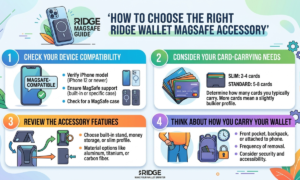
Choosing the right accessory becomes easier when you start with your own setup rather than the product’s appearance.
Check Your Device Compatibility
Identify your exact phone model first. For the Ridge Wallet for MagSafe, Ridge currently specifies compatibility with iPhone 13 and newer. Android users should review the requirements for the Strengthening Tray if they want to use the wallet with an Android device. This simple check can prevent compatibility problems later.
Consider Your Card-Carrying Needs
Count the cards you normally carry. If you regularly use several cards, the 1-to-12-card capacity of the Ridge Wallet for MagSafe may suit your needs. If your everyday carry is smaller, you may prefer to keep the wallet lightly loaded. The goal is not to use every available slot. It is to carry what you actually need.
Review the Accessory Features
Look at more than the magnetic function. Consider the wallet’s card capacity, materials, attachment method, RFID-blocking plates, and whether you need the optional Strengthening Tray.
Ridge also notes that the Wallet for MagSafe is not compatible with its QuickDraw Card Holder, so checking accessory compatibility before combining products is important.
Think About How You Carry Your Wallet
Finally, think about your routine. If you like keeping your phone and cards together, a MagSafe wallet may fit naturally into your day. If you frequently need to separate your wallet from your phone, make sure the quick-attach and removal design works for you. Also remember that the wallet needs to be removed when using a MagSafe charger.
Final Thoughts on Ridge Wallet MagSafe Accessories
The Ridge Wallet MagSafe combines a slim card wallet with magnetic phone attachment, giving users another way to organize their everyday essentials. Its current specifications include a 1-to-12-card capacity, N52 neodymium magnets, RFID-blocking plates, and 6061-T6 aluminum construction. Ridge also offers an optional Strengthening Tray for additional attachment support and broader device compatibility.
The most important step before buying is checking compatibility. iPhone users should verify their exact model and case, while Android users should review the requirements for the Strengthening Tray. It is also worth considering your card count and charging habits. If you frequently use MagSafe charging, remember that the wallet needs to be removed before charging.
FAQs About Ridge Wallet MagSafe Accessories
Does Ridge Wallet work with MagSafe?
Yes. Ridge offers a dedicated Wallet for MagSafe with integrated N52 neodymium magnets designed for connection with compatible MagSafe iPhones. Ridge currently lists the wallet as compatible with iPhone 13 and newer.
Do I need a MagSafe-compatible phone case?
If you want to use the wallet through an iPhone case, a MagSafe-compatible case is the appropriate choice. A case that does not support the required magnetic connection may affect attachment.
Can Android users use Ridge Wallet MagSafe accessories?
Yes, with the appropriate setup. Ridge states that its Strengthening Tray is compatible with Android devices.
How many cards can a Ridge Wallet hold?
Ridge states that the Wallet for MagSafe can hold 1 to 12 cards. The number you should carry depends on your needs. You do not need to fill the wallet to its maximum capacity if you only use a few cards regularly.
Can a MagSafe wallet interfere with wireless charging?
The wallet should be removed before using a MagSafe charger. Apple specifically instructs users to remove an iPhone wallet before placing the iPhone on a MagSafe charger or MagSafe Battery.
